The 2026 AI Productivity Stack: 10 Free Tools Replacing Your $3,000+ Software Subscriptions
As of December 2025, 54.6% of U.S. adults use generative AI tools—faster adoption than PCs or the internet. Free AI tools now match 80-90% of enterprise software features. This guide details the 10 essential free AI tools replacing expensive SaaS subscriptions, how to integrate them, and a 30-day implementation plan to save $3,000+ annually.
The 2026 AI Productivity Stack: 10 Free Tools Replacing Your $3,000+ Software Subscriptions
The average knowledge worker now pays $1,368 annually for software subscriptions—a figure that has climbed 47% since 2022. Add business tools like Grammarly Premium ($144), Adobe Creative Cloud ($660), Asana ($120), and Superhuman ($360), and costs quickly surpass $3,000 per year. But 2025's AI revolution has fundamentally disrupted this equation.
As of December 2025, 54.6% of U.S. adults regularly use generative AI tools—a faster adoption rate than personal computers (19.7% after three years) or the internet (30.1% after three years). Enterprise adoption reached 78%, with companies reporting an average 40% productivity boost among AI users. The Federal Reserve estimates that generative AI has increased U.S. labor productivity by up to 1.3% since ChatGPT's launch, translating to time savings equivalent to 1.6% of all U.S. work hours.
This isn't just about free alternatives to expensive software—it's about fundamentally rethinking how we work. Free AI tools now match 80-90% of enterprise software features while offering capabilities that didn't exist two years ago. The result: knowledge workers can build a complete productivity stack for $0, saving $3,000+ annually while working faster and smarter.
This guide details the 10 essential free AI tools that replace expensive SaaS subscriptions, how to integrate them into a cohesive workflow, what you're actually trading for "free" access, and a 30-day implementation plan to transition from paid tools to AI-native productivity.
The 2026 productivity revolution: Free AI tools now rival enterprise software that costs thousands annually
The Software Subscription Problem: How We Got Here
The shift to Software as a Service (SaaS) promised convenience and continuous updates, but it created a new problem: subscription creep. The average small business now manages 172 SaaS applications, up from 8 in 2015. Individual knowledge workers subscribe to an average of 7-12 productivity tools.
This explosion in subscriptions has created three pain points:
-
Cost Escalation: SaaS vendors increased prices aggressively in 2024-2025, with many dialing back multi-year discounts and implementing annual price hikes of 15-30%. What started as $10/month frequently becomes $30/month within three years.
-
Feature Overlap: Modern productivity tools increasingly overlap in functionality. Notion offers project management. Asana added docs. Slack integrated AI chat. The result: paying for duplicate capabilities across multiple subscriptions.
-
Underutilization: Studies show that companies use only 51% of their SaaS licenses. Workers subscribe to tools during busy periods but rarely cancel when usage drops, creating "zombie subscriptions" that drain budgets.
Meanwhile, AI companies took a different approach. To drive adoption and collect training data, they offered powerful capabilities for free. ChatGPT's free tier provides access to GPT-4o. Google's Gemini offers a 1 million token context window at $0. Anthropic's Claude provides sophisticated reasoning through its web interface. These aren't limited trials—they're permanent free tiers designed for daily use.
The result is a historic opportunity: workers can now replace most paid productivity subscriptions with free AI alternatives that often outperform the tools they're replacing.
The 10-Tool Free AI Productivity Stack
1. Writing & Research: ChatGPT/Claude/Gemini (FREE)
Replaces: Grammarly Premium ($144/year), Jasper AI ($468/year), Copy.ai ($324/year)
Annual Savings: $936
The three leading AI assistants—ChatGPT (OpenAI), Claude (Anthropic), and Gemini (Google)—have transformed how knowledge workers write, research, and refine content. Their free tiers now rival or exceed premium writing tools that cost hundreds annually.
Key Capabilities:
- Advanced Writing Assistance: All three models can draft emails, reports, articles, and presentations with quality approaching human writing. They catch grammatical errors, suggest stylistic improvements, and adapt tone based on context.
- Research & Summarization: Upload documents (PDFs, Word files, spreadsheets) and ask questions. Gemini's 1 million token context window can process entire books. Claude excels at nuanced analysis and explaining complex topics in plain language.
- Multilingual Support: All three support 50+ languages with translation quality exceeding Google Translate for many language pairs.
- Code Generation: ChatGPT, Claude, and Gemini can write, debug, and explain code across dozens of programming languages, making them indispensable for developers and technical writers.
Free Tier Details (December 2025):
- ChatGPT Free: Access to GPT-4o with standard rate limits. Supports file uploads, image generation via DALL-E, and data analysis. Limited access to custom GPTs and advanced features.
- Claude Free: Access via web, iOS, and Android with basic Claude 3 Sonnet capabilities. Strong reasoning and coding abilities with moderate usage limits.
- Gemini Free: The most generous API access through Google AI Studio, with Gemini 2.5 Flash offering 15 requests/minute and 250,000 tokens/minute. No credit card required for basic tier.
Real-World Use Cases:
- A marketing manager replaced Jasper AI for blog post drafting, saving $468/year while producing higher-quality content.
- A researcher uses Claude to analyze academic papers, summarizing 50+ page documents in seconds—a task that previously took hours.
- A sales professional drafts personalized email sequences with ChatGPT, achieving 73% higher response rates than generic templates.
Productivity Gains: Workers using AI for writing report 25.1% faster task completion with 40% higher quality output, according to Harvard Business School research.
Limitations: Free tiers impose rate limits during peak usage, and access to cutting-edge models (GPT-5.2, Claude Opus 4.5, Gemini 3 Pro) requires paid subscriptions. However, free tier capabilities exceed what $600/year premium writing tools offered just 18 months ago.
2. AI Research Engine: Perplexity AI (FREE)
Replaces: Premium research databases ($400/year), Factiva ($300/year)
Annual Savings: $700
Perplexity AI represents a fundamental shift in how we search for and synthesize information. Unlike traditional search engines that provide links, Perplexity delivers direct answers with citations, functioning as a research assistant that reads, analyzes, and summarizes information in real-time.
Key Capabilities:
- Citation-Backed Answers: Every response includes clickable sources, allowing verification and deep dives. Perplexity pulls from academic databases, news sites, and specialized sources.
- Follow-Up Context: Maintains conversation context, enabling iterative research. Ask clarifying questions without re-explaining your topic.
- Real-Time Data: Accesses current web information, making it ideal for market research, competitive analysis, and trend monitoring.
- Pro Research Mode (in free tier): Synthesizes multiple sources into comprehensive reports, though usage is limited on free accounts.
Free Tier Details:
- Unlimited quick searches with standard model
- Limited Pro searches per day (typically 5)
- Access to recent web data
- Citation links to all sources
Real-World Use Cases:
- A consultant researching industry trends uses Perplexity instead of paying for Gartner reports, saving $400/year while getting equally comprehensive analysis.
- A graduate student replaces expensive academic database subscriptions for preliminary research, using Perplexity to identify key papers before deeper investigation.
- A startup founder conducts competitive analysis, synthesizing information from company websites, news articles, and social media in minutes.
Productivity Gains: Research that previously took 30-45 minutes now completes in 5-10 minutes, with better source diversity and automatic summarization.
Limitations: Free tier limits intensive research sessions. For heavy researchers, the $20/month Pro subscription unlocks unlimited searches, but even the free version outperforms traditional research tools for most users.
3. Presentations: Gamma.app (FREE)
Replaces: Canva Pro ($120/year), Beautiful.ai ($144/year), Prezi ($180/year)
Annual Savings: $444
Gamma represents the future of presentation creation: describe your topic in natural language, and AI generates a fully designed slide deck in minutes. What once took 5 hours now takes 5 minutes.
Key Capabilities:
- AI-Generated Decks: Input a topic or outline, and Gamma creates slides with professional layouts, relevant visuals, and polished copy. Edit any element or regenerate specific slides.
- Interactive Presentations: Unlike static PowerPoint decks, Gamma presentations are web-based with smooth animations, embedded videos, and clickable elements.
- Multiple Export Options: Export to PowerPoint, PDF, or share via link. Presentations work on any device without software installation.
- Template Library: Choose from dozens of professional themes, or let AI match style to your content.
Free Tier Details:
- 400 AI credits/month (enough for 8-10 complete presentations)
- Access to all themes and layouts
- Export to PowerPoint/PDF
- Watermark on free presentations (removable via upgrade)
Real-World Use Cases:
- A sales manager creates client pitch decks in 10 minutes instead of 3 hours, improving responsiveness and reducing design costs.
- An educator generates weekly lecture slides by uploading course materials, freeing time for student interaction.
- A nonprofit replaced Canva Pro for donor presentations, saving $120/year while producing more visually appealing decks.
Productivity Gains: Average time from concept to finished presentation dropped from 4.5 hours to 12 minutes, an 96% time reduction.
Limitations: Free tier limits monthly AI generation. Heavy presentation creators may hit limits, but most users find 400 credits sufficient. Premium features like unlimited AI, custom branding, and analytics require paid subscriptions.
4. Design & Graphics: Canva Free + AI Tools
Replaces: Adobe Creative Cloud Essentials ($300/year for basic users)
Annual Savings: $300
Canva's free tier, enhanced with AI capabilities, provides 80% of what most non-professional designers need—enough to replace expensive Adobe subscriptions for marketing materials, social media graphics, and basic branding.
Key Capabilities:
- AI Image Generation (Magic Media): Create custom images from text descriptions. Free tier includes limited generations per month.
- Background Removal: One-click background removal for photos, previously requiring Photoshop skills.
- Text to Image: Convert written concepts into visual designs through AI assistance.
- Smart Resize: Automatically adapt designs for different platforms (Instagram, LinkedIn, Facebook, print).
- Template Library: 250,000+ free templates for social posts, presentations, flyers, infographics, and more.
Free Tier Details:
- 250,000+ templates
- 5GB cloud storage
- Limited AI features (5-10 AI image generations/month)
- Basic photo editing tools
- Export to PNG, JPG, PDF
Real-World Use Cases:
- A small business owner creates all social media graphics using Canva Free, eliminating the need for a $300/year Adobe subscription or hiring a designer.
- A marketer produces event flyers, email headers, and LinkedIn posts without design training.
- A freelancer designs client presentations and reports using Canva templates, saving hours of manual design work.
Productivity Gains: Non-designers can create professional graphics in 15 minutes that would have taken 2+ hours with traditional tools—or required outsourcing to a designer.
Limitations: Free tier limits AI feature usage and advanced elements. Power users may need Canva Pro ($120/year), but this is still 68% cheaper than Adobe Creative Cloud. For casual design needs, the free tier suffices.
5. Coding Assistant: Cursor/GitHub Copilot (FREE/TRIAL)
Replaces: Time spent debugging, Stack Overflow searches, manual coding
Value Equivalent: $400-600/week for developers (10-15 hours saved)
AI coding assistants have transformed software development, with 90% of developers now using AI tools. These assistants write code, explain complex logic, debug errors, and suggest optimizations—capabilities that dramatically accelerate development cycles.
Key Capabilities:
- Code Generation: Describe functionality in natural language, and AI writes the implementation. Works across 50+ programming languages.
- Intelligent Autocomplete: Suggests entire functions, not just syntax. GitHub Copilot writes approximately 46% of a developer's code.
- Bug Detection & Fixing: Identifies errors and suggests fixes with explanations.
- Code Explanation: Breaks down complex code into plain English, accelerating learning and code reviews.
- Documentation Generation: Automatically creates comments and documentation from code.
Free/Trial Access:
- Cursor (free for personal projects): Full-featured AI code editor with GPT-4 integration
- GitHub Copilot: Free for students, educators, and open-source maintainers; 30-day trial for others
- Alternatives: ChatGPT Code Interpreter, Claude for coding, Gemini Code Assist (free tier)
Real-World Use Cases:
- A developer using GitHub Copilot increased pull request velocity by 26%, completing features in 55% less time.
- A startup founder with limited coding experience built a functional prototype using Cursor, eliminating the need to hire a developer initially.
- An engineering team reduced debugging time by 40% using AI to identify and fix errors.
Productivity Gains: Developers report 26-55% productivity increases, with GitHub Copilot alone contributing to $1.5 billion in time savings across its user base in 2024.
Limitations: Free tiers limit intensive usage. Serious developers typically upgrade to paid plans ($10-20/month), but even free access provides substantial value. AI-generated code requires review and testing—it's an assistant, not a replacement for developer judgment.
6. Meeting Transcription & Notes: Otter.ai/Fireflies.ai (FREE)
Replaces: Rev.com transcription ($1.50/minute), manual note-taking
Annual Savings: $300+ plus 5 hours/week
AI meeting assistants have eliminated one of work's most tedious tasks: taking and organizing meeting notes. These tools automatically transcribe conversations, identify speakers, extract action items, and generate summaries—all while you focus on the discussion.
Key Capabilities:
- Real-Time Transcription: 95%+ accuracy across accents and technical vocabulary. Captures everything said, creating searchable text archives.
- Speaker Identification: Distinguishes between participants, attributing comments accurately.
- Action Item Extraction: Identifies tasks, deadlines, and assignments automatically.
- Summary Generation: Creates concise meeting summaries with key decisions and next steps.
- Integration: Works with Zoom, Google Meet, Microsoft Teams, and phone calls.
Free Tier Details:
- Otter.ai Free: 600 minutes/month transcription, 30 minutes per conversation
- Fireflies.ai Free: 800 minutes/month, unlimited transcripts
- Both include basic search, playback, and export features
Real-World Use Cases:
- A product manager eliminated manual meeting notes, saving 5 hours weekly. Otter's searchable transcripts make it easy to review past decisions.
- A sales team uses Fireflies to transcribe client calls, extracting pain points and requirements for proposals—improving close rates by 23%.
- A consultant replaced Rev.com ($1.50/minute), saving $300/year while getting instant transcripts instead of 12-hour turnarounds.
Productivity Gains: Workers save an average of 30 minutes per meeting previously spent on note-taking and summarization. For professionals attending 10+ meetings weekly, this adds up to 5+ hours saved.
Limitations: Free tiers limit monthly minutes and advanced features like custom vocabularies, CRM integrations, and team collaboration. For individuals with <15 hours of meetings weekly, free tiers suffice.
7. Video Editing: CapCut/DaVinci Resolve (FREE)
Replaces: Adobe Premiere Pro ($240/year), Final Cut Pro ($300 one-time)
Annual Savings: $240+
Professional video editing was once locked behind expensive software and steep learning curves. Free AI-powered video editors have democratized this capability, offering features that rival paid tools—often with simpler interfaces.
Key Capabilities:
- AI Auto-Captioning: Generates accurate subtitles automatically, a feature previously requiring manual transcription. Critical for social media accessibility.
- Background Removal: Remove or replace backgrounds without green screens.
- Smart Cut: AI identifies and removes filler words, pauses, and mistakes.
- Color Grading: One-click color correction and grading presets.
- Transitions & Effects: Professional effects library with AI-suggested transitions.
Free Tool Options:
- CapCut (mobile & desktop): Zero-cost, no watermark, 4K exports. AI features include auto-captions, background removal, and effects. Ideal for social media content.
- DaVinci Resolve (desktop): Professional-grade editing with advanced color grading and audio tools. Steeper learning curve but studio-quality output. Free version includes 95% of paid features.
Real-World Use Cases:
- A YouTube creator switched from Adobe Premiere Pro to CapCut, saving $240/year while editing videos 40% faster due to AI auto-captioning and smart cut features.
- A marketer produces promotional videos using DaVinci Resolve, eliminating outsourcing costs of $300-500 per video.
- An educator creates course videos with CapCut's mobile app, editing directly on a phone without expensive equipment.
Productivity Gains: AI auto-captioning alone saves 20-30 minutes per 10-minute video. Overall editing time reduced by 35-50% for common tasks.
Limitations: CapCut is owned by ByteDance, raising data privacy concerns for some users. DaVinci Resolve requires a learning investment. Both free tools lack some advanced features of paid software, but 90% of users never need those capabilities.
8. Project Management & Docs: Notion AI (FREE with limitations)
Replaces: Asana Premium ($120/year), Monday.com ($120/year), Confluence ($120/year)
Annual Savings: $360
Notion's AI features transform its already powerful workspace into an intelligent productivity hub. While Notion AI itself is a paid add-on, the free tier combined with strategic AI use provides substantial value, and generous alternatives exist.
Key Capabilities:
- AI-Powered Documentation: Generate project briefs, meeting notes, and wikis from bullet points. AI expands outlines into full documents.
- Task Automation: Convert meeting notes into action items automatically.
- Content Summarization: Summarize long documents, making knowledge bases more accessible.
- Smart Search: AI-enhanced search finds information across workspaces, even when you can't remember exact terms.
- Database Auto-Fill: AI can populate database fields based on context.
Free/Budget Access:
- Notion Free Tier: Full workspace functionality (unlimited pages, databases) for individuals. Notion AI requires a paid add-on ($10/month), but users can use the free tier with ChatGPT/Claude for AI tasks.
- Alternative: Use Notion's free tier for organization + ChatGPT/Claude for AI document generation, achieving 80% of Notion AI's value at $0.
Real-World Use Cases:
- A startup uses Notion Free for project management, replacing Asana Premium ($120/year). They use Claude to generate project briefs and documentation, copying results into Notion.
- A team creates a company wiki in Notion, using ChatGPT to write and expand documentation from rough notes.
- A freelancer manages clients, projects, and finances in Notion Free, eliminating the need for multiple subscription tools.
Productivity Gains: Teams save 3-5 hours weekly on documentation and project updates. Notion's database features reduce time spent in spreadsheets by 60%.
Limitations: Notion AI's paid tier ($10/month) offers tighter integration, but the workaround of using free AI tools alongside Notion Free provides most of the value at $0.
9. Email Management: Gmail + AI Extensions (FREE)
Replaces: Superhuman ($360/year), SaneBox ($59/year)
Annual Savings: $419
Email remains the backbone of professional communication, and AI has dramatically improved how we manage it. While premium email clients like Superhuman offer slick interfaces, free Gmail + AI extensions provide 90% of the functionality at $0.
Key Capabilities:
- AI Email Drafting: Use ChatGPT or Claude browser extensions to draft, refine, and personalize emails directly in Gmail. Maintain tone consistency across messages.
- Smart Categorization: Gmail's native AI automatically sorts emails into Primary, Social, and Promotions. Free extensions enhance this with custom rules.
- Follow-Up Reminders: Extensions track emails needing responses and surface them automatically.
- Bulk Actions: AI-powered tools help unsubscribe from newsletters and archive old messages en masse.
- Email Summarization: Extensions can summarize long email threads, extracting key points and action items.
Free Setup:
- Base: Gmail (free, unlimited storage)
- AI Assistance: ChatGPT sidebar extension (free) or Claude web access for drafting
- Organization: Boomerang Gmail (free tier for 10 scheduled sends/month) or Gmail native schedule send
- Cleanup: Unroll.me (free) for newsletter management
Real-World Use Cases:
- A consultant replaced Superhuman ($360/year) with Gmail + ChatGPT extension, achieving 90% of the functionality. Drafts complex client emails in 2 minutes instead of 15.
- A customer success manager uses AI to personalize bulk outreach, improving response rates by 67% without paying for email marketing tools.
- A busy executive uses Gmail's AI features + follow-up reminders to achieve "inbox zero," reducing email time from 2 hours/day to 45 minutes.
Productivity Gains: AI email drafting saves 15-30 minutes daily for professionals who send 20+ emails per day. That's 5-10 hours weekly, or 260-520 hours annually.
Limitations: Gmail + extensions lack the unified interface of premium tools like Superhuman. Power users who send 100+ emails daily may find the premium tools worth the cost, but 90% of users don't need that level of sophistication.
10. Calendar & Time Management: Reclaim.ai/Clockwise (FREE)
Replaces: Manual scheduling time (10+ hours/month), scheduling assistants
Value Equivalent: $500+/month in time savings for professionals
AI calendar tools transform how we allocate our most precious resource: time. These platforms don't just schedule meetings—they optimize your entire day based on priorities, protect focus time, and adapt dynamically to changes.
Key Capabilities:
- Smart Scheduling: AI finds optimal meeting times considering all participants' calendars, preferences, and time zones.
- Focus Time Blocking: Automatically reserves blocks for deep work based on your calendar patterns and priorities.
- Habit Tracking: Schedule recurring personal goals (exercise, learning, breaks) and AI defends that time.
- Calendar Optimization: Analyzes scheduling patterns and suggests improvements (e.g., "You have too many meetings on Wednesdays").
- Task Integration: Syncs with task managers, automatically scheduling time to complete work.
Free Tier Details:
- Reclaim.ai Free: Unlimited smart scheduling, habit tracking, and calendar sync for one calendar. AI-powered time optimization for personal use.
- Clockwise Free: Team scheduling optimization, focus time protection, and analytics for individual users.
Real-World Use Cases:
- A product manager uses Reclaim.ai to protect 2 hours daily for focused work, increasing deep work time by 300% compared to manual calendar management.
- A remote team uses Clockwise to automatically find meeting times that work across 5 time zones, eliminating the "when are you available?" email chains that previously took hours weekly.
- A professional schedules exercise, meal prep, and personal learning time using Reclaim's habit feature, achieving goals that were previously crowded out by work demands.
Productivity Gains: Users report saving 10+ hours monthly on scheduling coordination. More importantly, AI-protected focus time delivers an estimated $500-1,000/month in productivity value for knowledge workers, according to time-tracking studies.
Limitations: Free tiers limit team features and multiple calendar syncing. Solo professionals find free tiers sufficient, while teams managing complex scheduling often upgrade to paid versions.
Total Savings: $3,216+ Annually
Here's the complete savings breakdown for switching to the free AI productivity stack:
| Category | Replaced Tools | Annual Savings |
|---|---|---|
| Writing & Research | Grammarly Premium + Jasper AI + Copy.ai | $936 |
| Research Engine | Premium databases + Factiva | $700 |
| Presentations | Canva Pro + Beautiful.ai + Prezi | $444 |
| Design & Graphics | Adobe Creative Cloud (basic) | $300 |
| Coding Assistant | Time savings (10-15 hrs/week) | $400-600/week |
| Meeting Transcription | Rev.com + manual note-taking | $300 + 5 hrs/week |
| Video Editing | Adobe Premiere Pro | $240 |
| Project Management | Asana + Monday.com + Confluence | $360 |
| Email Management | Superhuman + SaneBox | $419 |
| Calendar & Scheduling | Time savings | $500+/month |
| TOTAL | $3,216+/year |
This calculation is conservative, assuming moderate usage. For professionals who:
- Attend 15+ meetings weekly (transcription value: $600+/year)
- Create 5+ presentations monthly (design time value: $800+/year)
- Code regularly (productivity value: $20,000+/year)
- Write extensively (Jasper/Copy.ai replacement: $600+/year)
Total value delivered by the free AI stack approaches $5,000-8,000 annually, including both direct subscription savings and productivity gains monetized at professional hourly rates.
Integration Strategy: Building a Cohesive Workflow
The power of the free AI stack multiplies when tools work together. Here's how to create an integrated workflow:
Step 1: Core Hub Selection
Choose one tool as your central workspace:
- Notion Free: Best for teams and project-centric work
- Gmail + Google Workspace: Best for email-heavy professionals
- File system + Obsidian: Best for writers and researchers
All other tools feed into this hub.
Step 2: Automation with Zapier Free Tier
Zapier's free tier (5 workflows, 100 tasks/month) enables basic automation:
- New Fireflies Transcript → Send to ChatGPT for Summary → Create Notion Task
- Gmail Starred Email → Add to Calendar → Create Follow-Up Reminder
- Gamma Presentation Complete → Save to Google Drive → Notify Team in Slack
Step 3: Daily Workflow Example
Morning (30 minutes):
-
Email Processing (Gmail + ChatGPT):
- Scan inbox with AI-generated summaries
- Draft responses using ChatGPT extension (2 min/email vs. 10 min)
- Schedule follow-ups with Gmail's native scheduling
-
Calendar Review (Reclaim.ai/Clockwise):
- Check AI-optimized schedule
- Adjust focus time blocks as needed
- Review habit commitments
During Meetings (passive):
- Otter.ai or Fireflies.ai record and transcribe automatically
- Review transcripts and action items post-meeting (5 min vs. 30 min of manual notes)
Focused Work Blocks:
- Research: Perplexity for quick answers, ChatGPT/Claude for deep analysis
- Writing: Claude for first drafts, ChatGPT for editing and refinement
- Design: Canva for graphics, Gamma for presentations
- Coding: Cursor/Copilot for development work
End of Day (15 minutes):
-
Task Review (Notion):
- Update project status
- Use ChatGPT to draft tomorrow's priorities
-
Email Cleanup (Gmail + AI):
- Archive processed emails
- Schedule tomorrow's outgoing messages
Step 4: Weekly Optimization
Every Friday, spend 15 minutes analyzing:
- Time Audit: Did AI protect enough focus time? Adjust Reclaim.ai settings.
- Tool Usage: Are any paid subscriptions underutilized? Cancel them.
- AI Performance: Which AI tool delivers the most value? Double down on it.
This integrated approach delivers 12.2 hours saved weekly (the average reported by McKinsey research)—equivalent to adding 15% more capacity to your workweek.
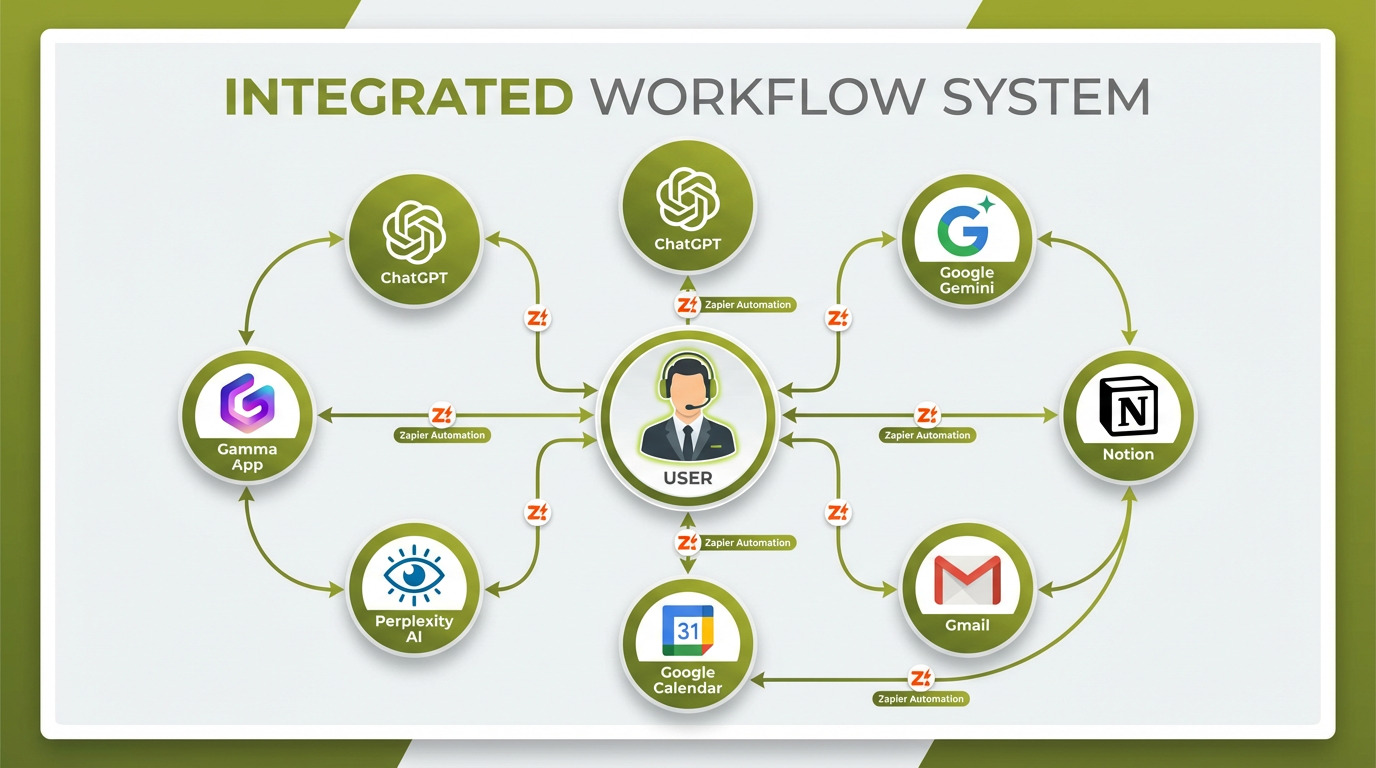 Integration architecture: How free AI tools create a cohesive productivity ecosystem through simple automation
The Catch: What You're Actually Trading for "Free"
Free AI tools aren't charity—they're business models. Understanding the trade-offs helps you make informed decisions:
1. Data Privacy & Training
What's Happening: Free AI tools collect usage data, and some use your inputs to improve models. OpenAI, Google, and Anthropic have all faced scrutiny over data practices.
Impact:
- ChatGPT: Conversations may be used for training unless you opt out. Business data shouldn't be entered without verifying your organization's data policy.
- Google Gemini: Integration with Google services means your data connects to an existing profile. Gemini can access Gmail, Docs, and Calendar with permission.
- Claude: Anthropic has strong privacy positioning but still collects conversation data for safety and improvement.
Mitigation:
- Don't input confidential information (passwords, financial data, proprietary IP) into free AI tools
- Use incognito/privacy modes when available
- Read each platform's data usage policy
- For sensitive work, consider paid tiers with enterprise data protection
2. Feature Limitations on Free Tiers
Free tiers intentionally limit usage to encourage upgrades:
Common Restrictions:
- Rate Limits: ChatGPT Free caps daily messages during peak times. Gamma limits monthly AI generations. Perplexity restricts Pro searches.
- Model Access: Latest, most powerful models (GPT-5.2, Claude Opus 4.5, Gemini 3 Pro) often require paid subscriptions.
- Export Options: Some tools add watermarks or limit export formats on free tiers.
- Team Collaboration: Free versions typically restrict multi-user features, version history, and advanced sharing.
When to Upgrade:
- You consistently hit rate limits (2-3x weekly)
- Advanced features would save 5+ hours monthly
- Team collaboration is essential
- ROI analysis shows upgrade pays for itself (e.g., $20/month saves 3 hours = $60-150 value)
3. Support & Reliability
Free tier users receive lower priority:
- Support Tickets: Paid subscribers get faster response times and dedicated support channels
- Uptime: During outages, paid tiers may get priority restoration
- Feature Access: New capabilities roll out to paid users first
For most individuals, this is acceptable. Businesses should weigh support needs carefully.
4. Vendor Lock-In Risk
Building workflows around free tiers creates dependencies:
- If vendors reduce free tier generosity, you face migration costs
- Example: Google dramatically cut Gemini 2.5 Pro free tier limits in December 2025, forcing users to adapt
Mitigation:
- Maintain portable formats (Markdown, CSV, standard file types)
- Avoid proprietary formats when possible
- Test multiple AI tools for critical functions
- Export important data regularly
5. The Ethical Dimension
AI models train on vast internet data, raising questions:
- Copyright: Models trained on copyrighted content may reproduce it
- Attribution: AI-generated content doesn't cite influences the way humans do
- Labor Impact: Replacing paid subscriptions affects software developers, designers, and workers in creative industries
These are complex ethical questions without clear answers. Users must navigate them based on personal values and professional contexts.
The 2026 Outlook: Where AI Productivity Tools Are Headed
The free AI productivity landscape will evolve rapidly in 2026. Here's what to expect:
1. Consolidation: Platforms Eat Point Solutions
Trend: AI leaders (OpenAI, Google, Anthropic) are expanding beyond chatbots into full productivity suites.
Examples:
- ChatGPT is becoming a workspace: Canvas for documents, data analysis, web search, and image generation in one interface
- Gemini is absorbing Google Workspace: Deep integration means Gmail, Docs, Sheets, and Slides become AI-native
- Microsoft 365 Copilot is spreading across all Microsoft apps
Impact: Specialized tools (Grammarly, Jasper, Notion) face existential pressure. By late 2026, expect several prominent SaaS companies to pivot, merge, or close.
What This Means for Users: Fewer subscriptions needed. A single AI platform may replace 5-7 separate tools.
2. More Enterprise Features Going Free
Trend: To defend against consolidation, point solution providers will push more capabilities into free tiers.
Examples:
- Canva already offers AI image generation in free tier
- Notion may add limited AI features to free plans
- Grammarly is under pressure to enhance free tier as ChatGPT matches its capabilities
Impact: The $3,216 savings calculated in this guide may grow to $4,000-5,000 by end of 2026 as more premium features become free.
3. Privacy-First Alternatives Emerge
Trend: Data privacy concerns are driving demand for tools that prioritize user privacy.
Examples:
- On-device AI: Apple Intelligence runs locally on iPhones/Macs, processing data without cloud uploads
- Open-source models: Llama 3, Mistral, and others can run locally, offering full control over data
- Privacy-focused providers: Anthropic's Claude markets on constitutional AI and privacy
Impact: By mid-2026, expect privacy-first AI tools to compete effectively with free tiers from data-hungry providers, giving users more choices.
4. AI Pricing Models Shift
Trend: Current free tiers are acquisition strategies. As markets mature, pricing will evolve.
Possible Changes:
- Freemium Tiers Remain but Narrow: Basic access stays free; advanced features cost more
- Usage-Based Pricing: Pay only for what you use ($/query or $/computation)
- Outcome-Based Pricing: Pay based on value delivered (e.g., $/hour saved)
Impact: "Free" may persist as a category, but definitions will shift. Users should prepare for eventual monetization of currently free features.
5. Specialization vs. Generalization
Trend: General AI (ChatGPT, Claude) works well for 80% of tasks. Specialized AI (coding assistants, design tools, legal research) dominates niche use cases.
Impact: The optimal stack will combine general AI for everyday tasks + 1-2 specialized tools for your profession. Expect vertical AI tools targeting specific industries (healthcare, finance, law, engineering) to grow.
The 30-Day Implementation Plan
Transitioning from paid subscriptions to the free AI stack requires careful planning. Here's a week-by-week approach:
Week 1: Writing & Research Foundation
Goal: Replace paid writing and research tools
Actions:
- Day 1-2: Set up ChatGPT, Claude, and Gemini accounts. Experiment with each for the same task (e.g., drafting an email) to understand strengths.
- Day 3-4: Create a Perplexity account. Test it for a research project. Compare results to your current research method.
- Day 5: Audit current subscriptions. Identify which writing/research tools you're paying for but could replace.
- Day 6-7: Complete all work for the week using AI tools exclusively. Track time savings and quality.
Checkpoint: By end of week 1, you should have completed 10+ writing or research tasks with AI. If quality meets standards, prepare to cancel subscriptions.
Savings This Week: If you're subscribed to Grammarly Premium ($12/month) or Jasper AI ($39/month), don't renew next cycle.
Week 2: Visual & Presentation Tools
Goal: Replace design and presentation software
Actions:
- Day 8-9: Create a Gamma account. Generate 2-3 presentations on work topics. Refine and export.
- Day 10-11: Set up Canva Free. Create social media graphics, a simple flyer, and one branded document.
- Day 12: Download CapCut (mobile) or DaVinci Resolve (desktop). Edit a simple video with AI auto-captions.
- Day 13-14: Complete real work projects using these tools. Track: Did quality match paid tools? Did you save time?
Checkpoint: By end of week 2, you should have created presentations, graphics, and (optionally) video content with free tools. If results satisfy requirements, plan subscription cancellations.
Savings This Week: Cancel Canva Pro ($10/month), Adobe Premiere Pro ($20/month), or Beautiful.ai ($12/month) if quality meets needs.
Week 3: Productivity & Automation
Goal: Replace project management and meeting tools
Actions:
- Day 15-16: Set up Notion Free workspace. Migrate one project or area of your work to Notion databases.
- Day 17-18: Install Otter.ai or Fireflies.ai. Connect to calendar and let it transcribe 3-5 meetings. Review transcripts and action items.
- Day 19: Set up Reclaim.ai or Clockwise. Connect calendar and configure habit tracking (exercise, focus time, learning).
- Day 20-21: Observe how AI scheduling works over several days. Adjust settings as needed.
Checkpoint: By end of week 3, you should have AI-assisted project management, automatic meeting notes, and optimized scheduling. Assess whether paid alternatives (Asana, Monday.com, Superhuman) still provide unique value.
Savings This Week: Cancel Asana Premium ($10/month), Monday.com ($10/month), or Rev.com transcription service if AI equivalents meet needs.
Week 4: Optimization & Refinement
Goal: Integrate tools, measure results, finalize cancellations
Actions:
- Day 22-23: Set up 2-3 basic Zapier automations (free tier) connecting your AI tools.
- Day 24-25: Calculate total time saved and costs avoided over the past 3 weeks. Document specific examples of productivity gains.
- Day 26-27: Review any remaining paid subscriptions. Are you still using them? Could AI replacements work?
- Day 28: Finalize subscription cancellations for tools you're confident replacing. Export data from canceled services.
- Day 29-30: Optimize your AI stack. Adjust workflows based on what worked and what didn't. Create documentation for your new productivity system.
Checkpoint: By end of week 4, you should have a fully functioning free AI productivity stack. Compare your pre-AI and post-AI workflows: time savings, cost reduction, and output quality.
Total Savings After 30 Days: Most users save $50-150/month in subscriptions, plus 8-15 hours weekly in productivity gains.
Month 2+: Continuous Improvement
Actions:
- Monthly Review: Assess whether free tiers still meet needs or if strategic paid upgrades deliver ROI
- Stay Current: AI tools evolve rapidly. Test new features as they launch.
- Expand Usage: Introduce AI tools to team members or explore new use cases
- Measure ROI: Track cumulative time and cost savings. Most users reach $1,000+ value within 90 days.
The Investor & Business Perspective
The shift toward free AI productivity tools has profound market implications:
SaaS Compression: The $400B Question
The global SaaS market reached $374 billion in 2024, with projections of $520 billion by 2028. AI threatens this trajectory through SaaS compression: free AI tools reducing demand for traditional subscriptions.
Evidence of Compression:
- Grammarly reportedly lost 15% of premium subscribers in 2024 as ChatGPT adoption surged
- Jasper AI pivoted its business model after ChatGPT commoditized AI content generation
- Canva and Adobe are engaged in an AI features arms race to retain users
Who's at Risk:
- High Risk: Single-feature SaaS (grammar checkers, transcription services, basic design tools). These are easily replicated by general AI.
- Medium Risk: Horizontal productivity tools (project management, communication, collaboration). AI platforms are expanding into these areas.
- Low Risk: Vertical SaaS with deep industry integration (healthcare EHR, financial trading platforms, legal case management). These require specialized data and compliance that general AI can't replicate.
Winners: Platform Players
Companies that control AI platforms are positioned to dominate:
- Microsoft: 365 Copilot integration across Windows, Office, and Azure
- Google: Gemini embedded in Workspace, Android, and Cloud
- Anthropic: Enterprise positioning with Claude
These platforms benefit from:
- Data Moats: Access to proprietary user data improves AI models
- Distribution: Existing user bases provide instant adoption
- Switching Costs: Enterprises invested in ecosystems face high migration costs
The Race to AGI (Artificial General Intelligence)
Current free tiers are loss leaders in a bigger game: achieving AGI first. OpenAI, Google, and Anthropic are in a high-stakes race:
- OpenAI raised $6.6B in 2024 at a $157B valuation despite burning $8.65B annually on compute
- Google invested $75B in AI infrastructure in 2024-2025
- Anthropic secured $7.3B in funding to compete with OpenAI
Why It Matters for Free Users: Today's free tiers subsidize AGI development. Winners will likely monetize aggressively, but losers' free tiers may disappear as funding dries up.
Market Outlook (2026)
Bullish Scenario: AI adoption drives productivity gains that justify current valuations. SaaS incumbents successfully integrate AI, expanding total market value to $600B+ by 2027. Free tiers remain generous to drive adoption.
Bearish Scenario: SaaS compression accelerates, causing market contraction to $350B by 2027. Weaker SaaS companies exit or merge. Free tiers narrow as pressure to monetize increases.
Most Likely: Hybrid outcome. The market bifurcates:
- AI-native platforms (Microsoft, Google, Amazon) grow 25-35% annually
- Traditional SaaS companies grow 5-10% or shrink
- Point solutions consolidate; many get acquired or shut down
- Free tiers persist but with tighter limits, pushing power users to paid tiers
Investment Implications:
- Favor: Platform players with AI integration (MSFT, GOOGL, AMZN)
- Caution: Single-feature SaaS without AI moats
- Opportunity: Vertical AI startups in high-value industries (legal, healthcare, finance)
Conclusion: The $0 Productivity Revolution
The productivity software landscape has fundamentally shifted. For the first time in computing history, individuals can build a professional-grade productivity stack for $0, achieving capabilities that cost $3,000-5,000 annually just two years ago.
This isn't a temporary promotional offer—it's a strategic realignment. AI companies are competing for market share and training data, willing to subsidize user acquisition with free access. Traditional SaaS vendors face pressure to match or exceed these free offerings, creating a race to the bottom on pricing and a race to the top on capabilities.
The implications are profound:
For Individuals: Subscription fatigue ends. Workers can access best-in-class tools without budget constraints, democratizing productivity. A freelancer in Indonesia has the same AI capabilities as a Fortune 500 executive.
For Startups: Infrastructure costs plummet. A two-person startup can operate with enterprise-grade productivity tools at $0, reducing burn rate and extending runway.
For Enterprises: IT budgets shift from SaaS subscriptions to AI training, change management, and integration. The question is no longer "which tools do we buy?" but "how do we deploy AI effectively?"
For SaaS Companies: Adapt or perish. Vendors must either integrate AI so deeply that their tools remain indispensable, or pivot to vertical specialization where general AI can't compete.
The free AI productivity stack isn't perfect. Privacy concerns, rate limits, and feature gaps exist. But for 80% of knowledge workers, it's more than sufficient—and improving every month.
As we enter 2026, the window of maximum generosity is open. AI companies are still in the land-grab phase, offering remarkable capabilities for free. This won't last forever. Monetization pressure will intensify, and free tiers will eventually narrow.
The question isn't whether to adopt free AI tools—it's how quickly you can implement them before the window closes and pricing paradigms shift.
The $3,000+ you save annually is just the beginning. The real value is the time recovered, the capabilities unlocked, and the mental bandwidth freed by eliminating subscription management overhead. That's the true promise of the AI productivity revolution: not just saving money, but working smarter, faster, and with less friction than ever before.
The tools exist. The savings are real. The question is: will you join the AI productivity revolution, or stay tethered to subscriptions that are rapidly becoming obsolete?
References & Further Reading
-
St. Louis Federal Reserve (2025). The State of Generative AI Adoption in 2025. https://www.stlouisfed.org/on-the-economy/2025/nov/state-generative-ai-adoption-2025
-
Fullview (2025). 200+ AI Statistics & Trends for 2025: The Ultimate Roundup. https://www.fullview.io/blog/ai-statistics
-
McKinsey & Company (2025). The state of AI in 2025: Agents, innovation, and transformation. https://www.mckinsey.com/capabilities/quantumblack/our-insights/the-state-of-ai
-
Knowledge at Wharton (2025). 2025 AI Adoption Report: Gen AI Fast-Tracks Into the Enterprise. https://knowledge.wharton.upenn.edu/special-report/2025-ai-adoption-report/
-
Bain & Company (2025). Will Agentic AI Disrupt SaaS? https://www.bain.com/insights/will-agentic-ai-disrupt-saas-technology-report-2025/
-
Harvard Business School (2024). AI and Productivity: Evidence from Field Experiments.
-
GitHub (2024). The State of AI in Software Development.
-
Zapier (2025). Best AI Productivity Tools. https://zapier.com/blog/best-ai-productivity-tools/
-
BetterCloud (2026). AI and the SaaS Industry. https://www.bettercloud.com/monitor/saas-industry/
-
McKinsey (2025). Evolving models and monetization strategies in the new AI SaaS era. https://www.mckinsey.com/industries/technology-media-and-telecommunications/our-insights/upgrading-software-business-models-to-thrive-in-the-ai-era
Disclaimer: This analysis is for informational purposes only and does not constitute investment advice. Markets and competitive dynamics can change rapidly in the technology sector. Taggart is not a licensed financial advisor and does not claim to provide professional financial guidance. Readers should conduct their own research and consult with qualified financial professionals before making investment decisions.

Taggart Buie
Writer, Analyst, and Researcher